 Resale Record
The Pile
Your inventory in one place: search, filters by age, bins, a map of where you sourced, bulk actions and the items that need a price or a cost.
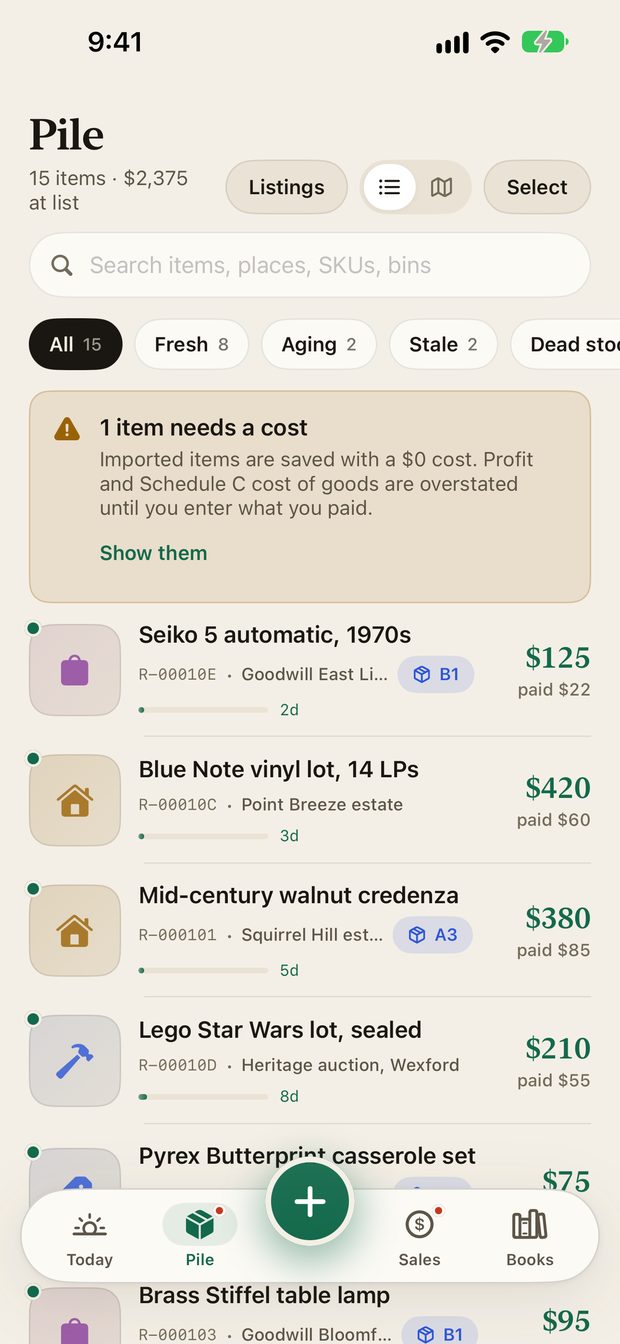
The Pile is everything you have bought and not sold. It shows how many items you hold and what they are worth at list price, so you can see what is tied up on your shelves.
Search and filter#
- Search by item name, place, SKU or bin.
- Filter chips group items by age: All, Fresh, Aging, Stale and Dead stock. Each shows a count.
- Sort the list from the menu.
- Switch between the list and a map of where your pickups came from.
How age works#
Every row has a small aging bar and the number of days the item has been in your pile, so slow movers stand out. On Today, the Needs attention list calls out dead-stock items that have been sitting 90 days or more, with the money tied up in them.
Bins#
Give an item a bin, such as A3 or B1, to find it on the shelf later. Use All bins to look at one bin at a time. A printed item label can carry the bin too.
Actions on an item#
Swipe a row, or open the menu on an item, for actions such as:
- List on eBay and Price check.
- Mark sold, Donate or Mark donated.
- Edit details, Copy SKU and Share.
- For items listed on eBay: Manage eBay listing, End listing and Relist.
Tap Select to choose several rows and act on them together.
Items that need attention#
See Costs needed for how to fix them in one pass.
Add a spreadsheet of history#
If you already track your stock somewhere else, use Import to bring it in. See Import a spreadsheet.
Something missing or out of date? Email support@resalerecord.com and tell us what you expected to see.