 Resale Record
Connect eBay
Connect your eBay seller account so orders become sales and your listings, messages, offers and feedback show up in the app. Optional and reversible.
Connecting eBay is optional. Everything else in the app works without it. With eBay connected, Resale Record can bring in your sales, show your listings, and let you read and answer buyer messages and offers.
Resale Record works with US eBay (ebay.com) seller accounts for now. It is an independent app and is not affiliated with or endorsed by eBay.
Connect your account#
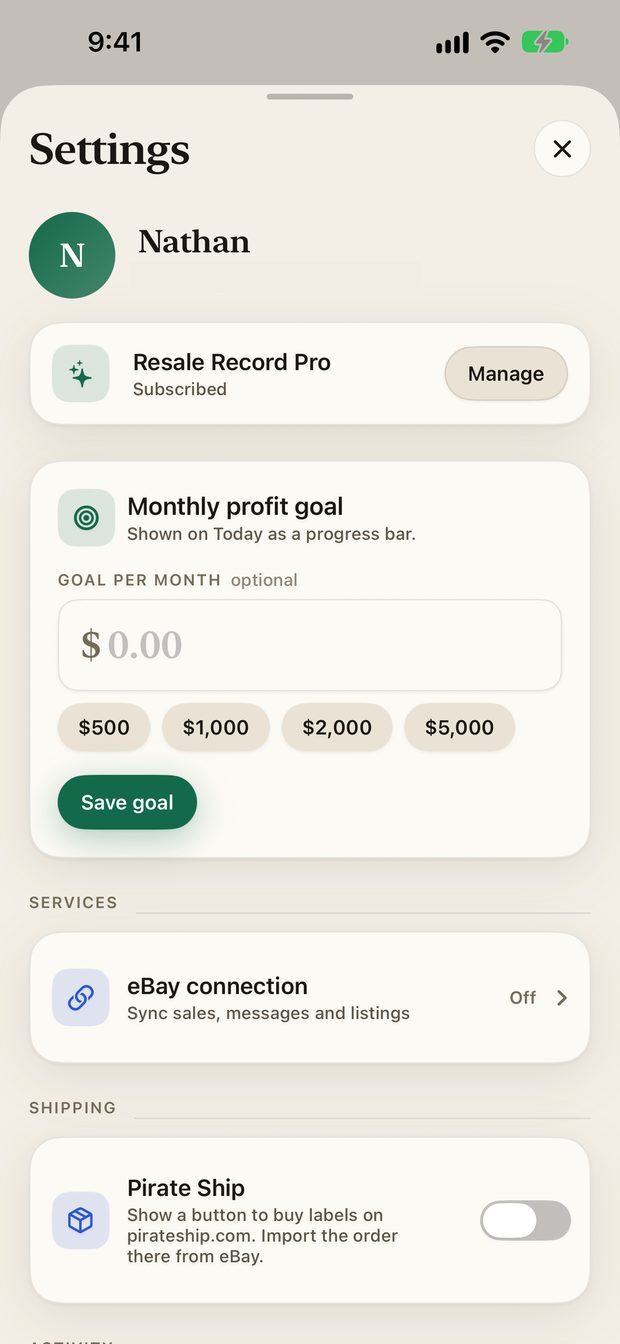
- Open Settings (tap your avatar on Today), then eBay connection.
- Tap Connect eBay. eBay's own sign-in page opens in the app.
- Sign in to eBay and approve access.
What it does with your account#
- Orders become sales. Your eBay orders are imported into the Sales tab.
- Listings. The Listings screen shows what you have live on eBay, including listings you created on eBay itself.
- Messages and offers. The eBay Inbox shows buyer messages and offers, and you can reply from the app.
- Feedback. See what buyers have said about you.
- List one like this. Prepares a new listing from a price check comparable. Nothing is published until you confirm.
Your data updates when you open the app or pull down to refresh. It is not a live feed.
Disconnect#
Open Settings, eBay connection, tap Disconnect and confirm. The token is deleted and cached eBay data is cleared.
Troubleshooting#
- The sign-in page does not finish. Close it, then tap Try again or Connect eBay again. Make sure you are signing in to the seller account you use on ebay.com.
- I do not see a recent sale. Pull down to refresh on the Sales tab.
- Something looks wrong after connecting. Disconnect and connect again, or use Reconnect eBay if it is shown.
See Troubleshooting for more, and the privacy policy for exactly what eBay data is stored and for how long.
Something missing or out of date? Email support@resalerecord.com and tell us what you expected to see.