 Resale Record
Subscription and account
The 7-day free trial, subscription, restore and cancel, sign-in and password help, the optional AI features, and deleting your account and data.
Trial and subscription#
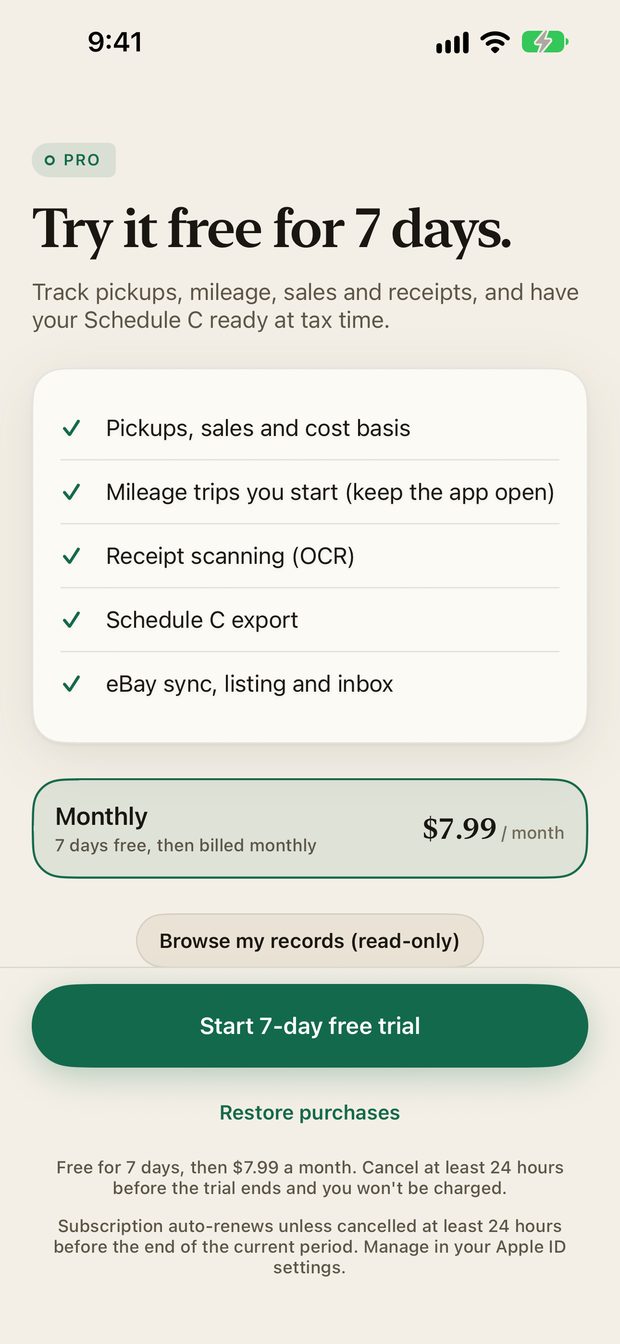
Resale Record has one subscription, Resale Record Pro. There is no separate free tier. New accounts start with a 7-day free trial. The price, the trial and the renewal terms are shown on the paywall before you subscribe, along with links to the Terms of Use and Privacy Policy.
- Manage or cancel. On iPhone and iPad, subscriptions are handled by Apple: open the Settings app, tap your name, then Subscriptions. On Android, they are handled by Google Play: open the Play Store, tap your profile picture, then Payments & subscriptions, then Subscriptions. Deleting your Resale Record account does not cancel the subscription.
- Restore purchases. If you reinstall or sign in on a new device, use Restore purchases on the paywall.
- If your subscription ends. The app becomes read-only. Your records stay, and you can choose Browse my records to look at them. Adding, importing and editing resume when you subscribe again.
During the iPhone and iPad TestFlight beta, purchases run in Apple's sandbox, so you are not charged. On Android, the app is on Google Play and purchases are real.
Sign in and password#
You can sign in with Apple (iPhone and iPad), with Google (Android), or with an email and password. To change your password, open Settings, Password. If you forgot it, use Forgot password on the sign-in sheet. We email a single-use link to a page on resalerecord.com where you set a new one.
Optional AI features#
Three features use an AI service, and each asks for your permission in the app before the first use. If you decline, the rest of the app works normally.
| Feature | What is sent |
|---|---|
| Receipt reading (donations, expenses) | The receipt photo |
| Listing description | The item title and your pickup notes |
| Reply drafts | The conversation messages and item title. The draft is never sent automatically. |
The requests go to OpenRouter, which routes them to an AI model. See the privacy policy for details.
Your data#
- Export first. You can export your tax records from Books before you delete anything.
- Delete your account. Open Settings, Delete account, then confirm. This permanently deletes your account, records, photos and receipts. It cannot be undone.
- Privacy. Read the privacy policy and terms.
Contact#
Questions, bugs or ideas: support@resalerecord.com. For a bug, please include a screenshot, your device and iOS version, and the steps that caused it. See Support.
Something missing or out of date? Email support@resalerecord.com and tell us what you expected to see.