 Resale Record
Mileage
Track sourcing and shipping trips with GPS, keep a running deduction for the year, log a forgotten trip and mark personal trips so they never count.
Driving to source inventory, ship orders and buy supplies can be a business expense, and the deduction only holds up with a log. Mileage in Resale Record builds that log for you.
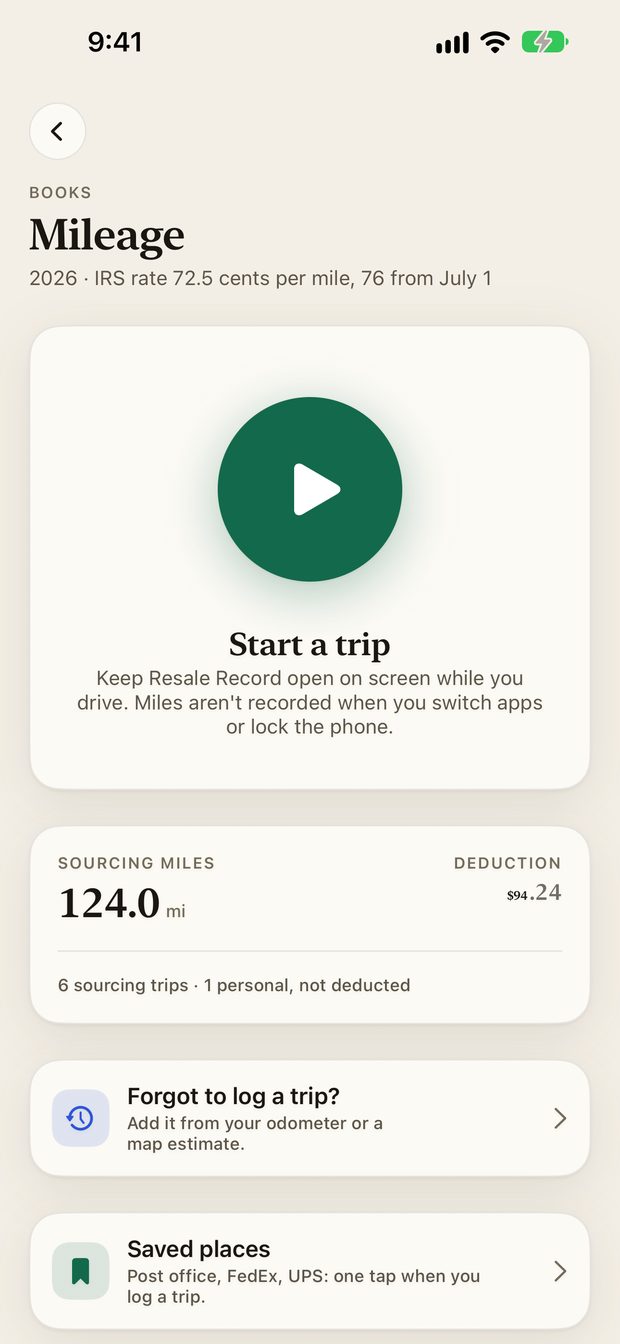
Record a trip#
- Open Books, Mileage (or Capture, Trip).
- Tap Start a trip when you leave.
- Drive. The app measures the distance with GPS while the trip runs.
- Tap stop when you arrive and choose what the trip was for.
The running total#
The screen shows your sourcing miles and the deduction for the year, using the IRS rate for each trip's date. The header shows the rate in effect, and notes when it changes during the year.
Personal trips never count#
Each trip has a classification. Personal trips never count toward the deduction. The total tells you how many trips were personal and left out.
Forgot to log a trip?#
Tap Forgot to log a trip? to add it from your odometer or a map estimate.
Saved places#
Saved places are spots you visit often, such as the post office, FedEx or UPS. One tap starts a log with the place filled in.
Reminders#
Mileage reminders are optional local notifications that nudge you when a sourcing trip may have gone unlogged. Turn them off in iOS Settings at any time.
Privacy#
Location is only used while the app is open and a trip is running or being logged. See the privacy policy.
For what a good mileage log contains, read How to keep a mileage log for reselling.
Something missing or out of date? Email support@resalerecord.com and tell us what you expected to see.